

Dead on Amazon. Still Earning on YouTube
What to put in your YouTube title, description, and how to upload your first video
This newsletter contains affiliate links. If you purchase through my links I may earn a commission at no extra cost to you.
This is Part 2 of a series about using YouTube as the core of your offsite strategy. If you missed Part 1, start there — it walks you through setting up your youtube channel, getting compliant with Amazon’s TOS, and creating your disclosure template.

The channel is set up. The compliance boxes are checked. Now you’re going to put something on it.
Before you hit upload, there are a few things to understand about what this video actually is and what you can do with it that has nothing to do with Amazon.
This Video Belongs to You
Someone posted in a Facebook group last week about a problem most of us will eventually run into. She had filmed a full review. Good video. Solid work. By the time she went to upload it, the product had been pulled from Amazon.
She thought the video was garbage.
It isn’t. She just needs to rethink how she can use it.
Your YouTube channel is not an extension of your Amazon storefront. It is a separate library that you own and control. The links inside it can point anywhere. Amazon, a brand’s direct website, another affiliate program entirely. What you film belongs to you. Where the link points is a decision you can change at any time.
Products cycle in and out of Amazon constantly. Your videos don’t have to go stale with them.
Dead on Amazon does not mean dead everywhere. That video can still be monetized through the brand’s own affiliate program, a different retailer carrying the same product, or a direct partnership. All she has to do is find a program that carries it, or reach out to the brand directly.
Before You Upload Anything
If you have been using PostTap for your Amazon links, it is worth knowing that PostTap is not exclusively an Amazon tool, but its primary use case is maximizing Amazon affiliate commissions. The moment your strategy expands beyond Amazon, you will want a tool built for that flexibility from the start. That said, PostTap still has a role — you will likely want to keep using it for Pinterest, where it performs well for Amazon links.
The solution for YouTube is a deep link.
A standard affiliate link opens in your phone’s browser. The person clicking has to log in, locate their account, enter payment information. That friction kills sales.
A deep link opens directly in the Amazon app. They are already logged in. Payment information is saved. One click and they are done.
That is the first reason deep linking matters. There are two more.
Deep links handle international traffic automatically. A viewer in the UK clicks your link and lands on amazon.co.uk with your affiliate tag intact. Canada goes to amazon.ca. You are not losing those commissions to a redirect that drops your tag.
And when a product changes, goes unavailable, gets relisted, or you want to point somewhere else entirely, you update the destination once in your link tool. Every video you have ever published using that link updates with it. You do not touch the videos. The only thing you will likely need to change is your disclosure.
Two tools handle deep linking for AIP creators: GeniusLink and URLVue.
Before you choose either one, there is something you need to understand about both. If you stop using either platform, your links die. Every video you have ever published stops working at that link. You are not just picking a tool. You are choosing a long-term partner before you fully know what you are getting into. It is a little like deciding who to marry after a ten-minute speed date.
GeniusLink starts at six dollars a month. It is a standalone linking service that has been doing it reliably for years. The dashboard alerts you when links have died so that you can change them right away. This is the one I started with and still use.
URLVue is Viral Vue's (you can use Welcome10 for 10% off) deep linking feature, included in their Professional plan, which is currently seventy-nine dollars a month. You can downgrade your plan and keep your links. Viral Vue does significantly more than linking. Product research, brand deals, campaign tracking. Depending on where you are in your Amazon Influencer journey, you may already be using it for those reasons. If so, URLVue is already in your toolkit. If you are brand new, the Professional plan may be more than you need right now. We will cover Viral Vue as we move through the Offsite Playbook.
Let’s Get Your First Video Uploaded
Go to YouTube Studio. Click the camera icon at the top right and select Upload videos.
Your Title
Write toward the search. Not toward Amazon.
“Amazon” does not belong in your title or your description. The people searching YouTube are not typing “Amazon product review.” They are typing “best knife block for small kitchens” or “cordless vacuum for hardwood floors.” Write the title for the person searching, not for the platform selling.
Your Description
Your disclosure template from Part 1 is already auto-populated here. Leave it exactly where it is. Start above it.
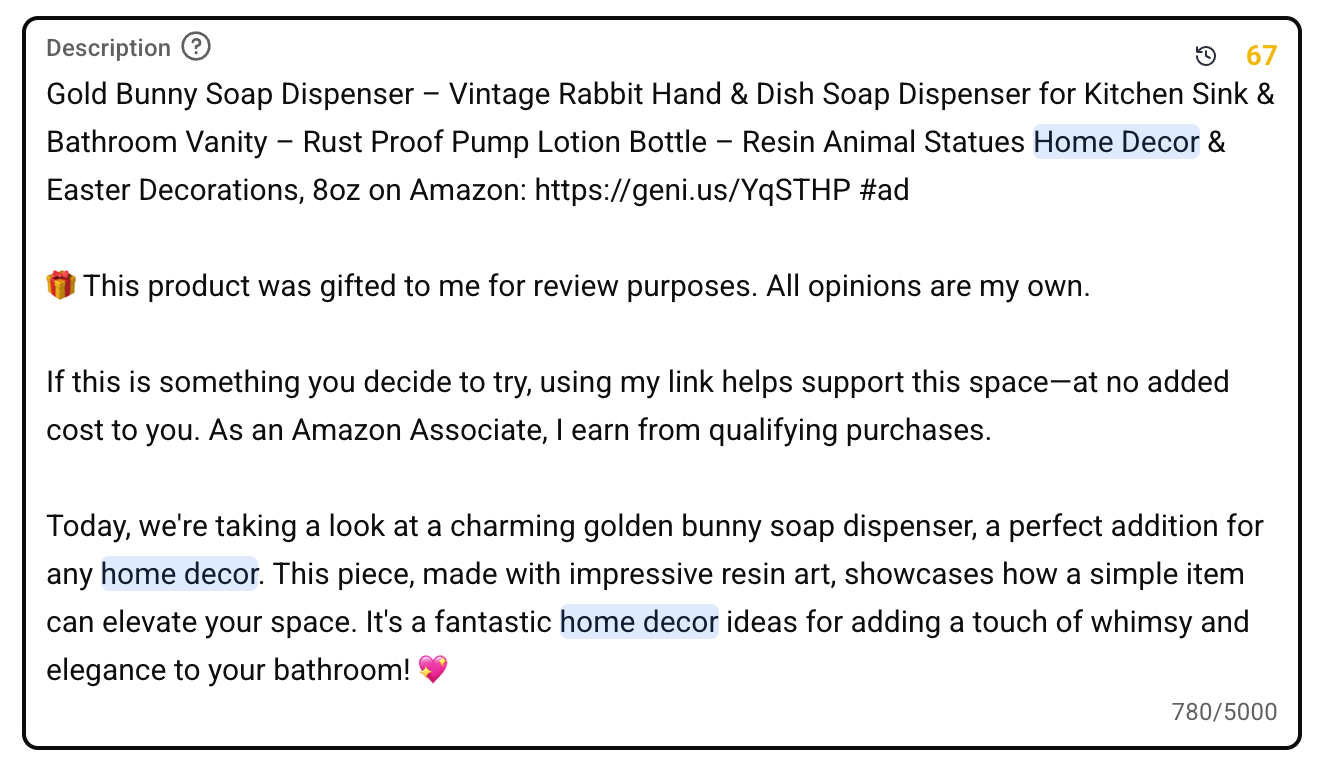
The first line is your product name followed by your link and #ad.
Below that, write one or two lines about who this product is useful for and why. Use the product name again. Keep it specific to the product.
Here is what a complete description looks like.
Playlists: Let’s Get Set Up For Longterm Success
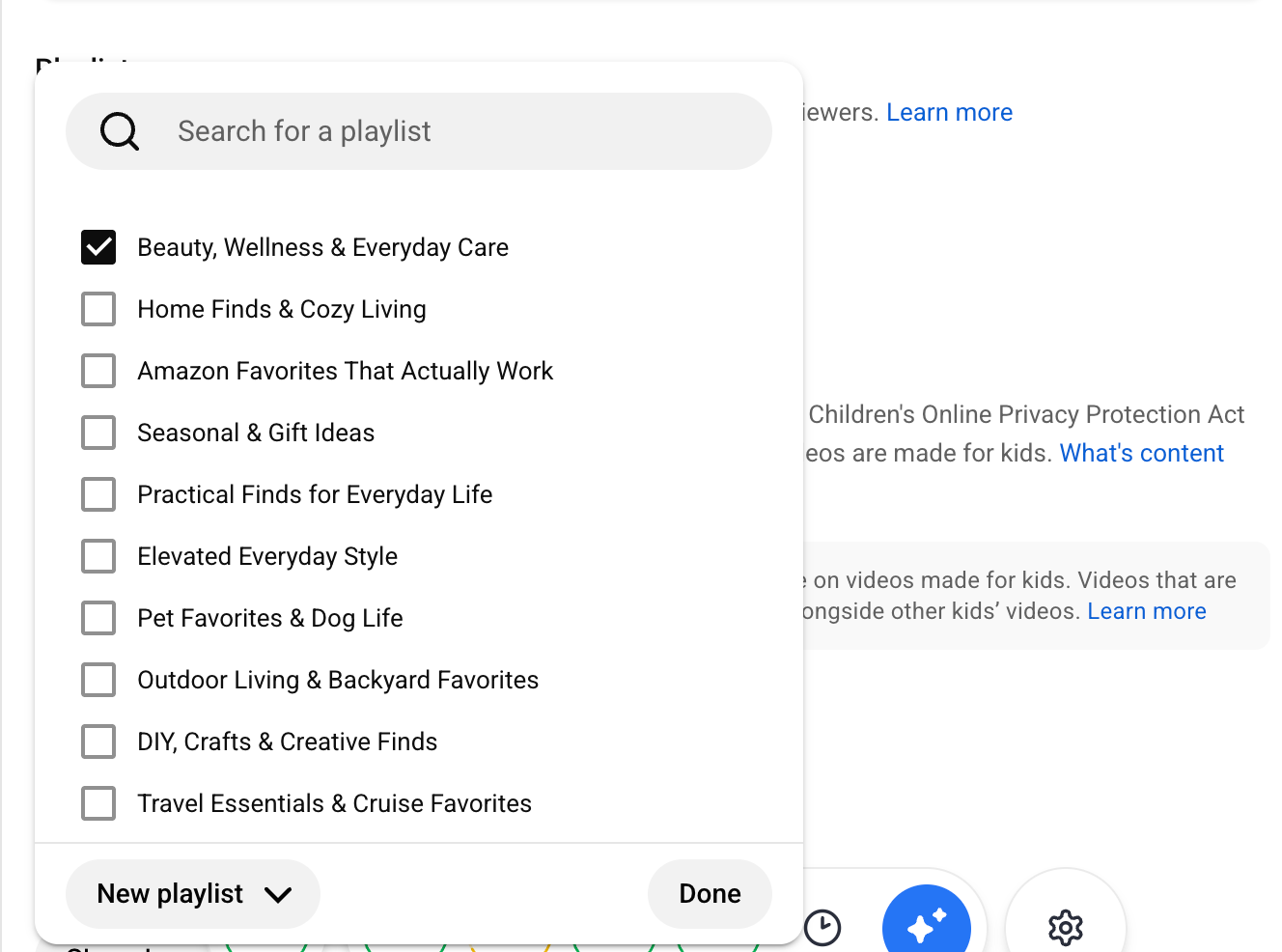
When you reach the Playlist section, click the Select dropdown. At the bottom of the list you will see New playlist.
Before you create the playlist for this video, do something that sounds counterintuitive. Create all of your playlists right now.
Every category you plan to review. Kitchen. Lawn and Garden. Office. Pet Supplies. Whatever fits your content. Build the full structure while this window is open. When we get to Part 3 and you are moving your existing library over to YouTube, every playlist will already be waiting. You will not be stopping mid-upload to build infrastructure.
Not sure what to name your playlists? Claude or ChatGPT can help you come up with playlist names and descriptions that are search-friendly. Give it your niche and ask for playlist name suggestions — it takes about two minutes.
For each playlist, give it a name using words people actually search for, set it to Public, and click Create. Once you have built them all, check the playlist for this video and click Done. Below are mine: Please don’t copy them word for word. It won’t help your SEO or mine.
Visibility
Set your video to Public or schedule it out.
If you are working through a large existing library, schedule no more than three videos per day, spaced about eight hours apart.
Shorts, Long-Form, and How You Should Be Shooting From Here Forward
From this point forward, if you don’t already, get in the habit of shooting your videos horizontally.
Horizontal is the format YouTube long-form requires. It will matter if you reach the point of monetizing your YouTube channel directly, and it is simply best practice if you ever choose to share your content across other affiliate networks down the road.
You do not have to give up vertical content for TikTok or Instagram. There are programs that will convert your long-form horizontal video into Shorts and vertical formats, so the content works across platforms without filming everything twice. OpusClip is one worth looking at.
What you do need to understand is that Shorts do not have clickable hyperlinks. The link sits in the description and cannot be tapped. Long-form is where your affiliate link actually functions. That is the format worth prioritizing.
The Video Is Yours
If the woman from the Facebook group had this strategy in place, she would have been able to adapt quickly. While it was unfortunate that the product was no longer available on Amazon, she had other monetization opportunities available to her. She just didn’t have the architecture yet.
Your YouTube channel is the architecture. The videos live there regardless of what any affiliate program does. The links are swappable. A video you publish today will still be indexed and discoverable years from now. When the destination changes, you update the link once and every video that uses it points somewhere new.
What you have done today is start the foundation of a long-term strategy, one that monetizes and protects your brand’s assets. Congratulations on making a big move off-site.
Coming Up in Part Three
Now that you have done one, you understand the architecture. It is time to address the massive library you have likely built up over your Amazon Influencer career.
Most of you have hundreds of videos already sitting on Amazon. Reviews you filmed, uploaded, and moved on from. Part three is about what to do with that existing library. The tools and workflow that make it possible to move everything over without doing it one video at a time.
🖋️ Barb
Thank you @susanhudgins for helping me to correct two details in here. I so appreciate extra eyes. Its hard to keep up with all of the ever changing features and platforms so I always welcome the help!
If anyone ever see's anything that just doesn't seem right, please call my attention to it. I want everything to be completely accurate and things will change with these platforms as time goes on!